PLAY_TO_MAKE.md — make the game while playing it
A principle, not a rule: a five-year-old can make a game. When you start the engine you are already inside a game, playing, and making it is part of the play. Drag a person out, pick up a bat, bonk them, watch them ragdoll: that is fun on its own, and it is also the first step of building something.
The same world has three doors, one per kind of person, and every door opens onto the same building blocks:
| Level | Who | How you make things | Status |
|---|---|---|---|
| Simple | A five-year-old, anyone trying it for the first time | Drag big pictures into the world, click to use them | First prototype in the sandbox (below) |
| Intermediate | Creative people who don't write code | A node graph (blueprints): wire "when this happens" to "do that" | First version in the sandbox: the Look tool (below) |
| Advanced | Programmers | Plain Lua scripts (SCRIPTING.md) | Lua v2 works today; the play blocks are bound as play.* |
One set of building blocks
The three levels must not be three engines. Everything is built from one set of blocks, and each level is just a different way of holding them:
- Things you put in the world: a person, a box, a ball, a light.
- Tools you hold: a bat, a ball launcher, a paint brush.
- Events that happen: clicked, hit, touched, fell over, timer.
- Actions that make something happen: ragdoll, push, spawn, remove, play a sound, add a point.
Each block is written once in C++ (pure logic where possible, unit-tested,
like kke/PlayBlocks.h) and exposed to Lua. Lua is the contract:
- Advanced calls the blocks directly:
play.spawn("person", pos),hook.Add("Hit", ...),play.ragdoll(id, push). - Intermediate nodes are those same functions and events drawn as boxes. A graph runs by calling the same bindings (and can be shown as the Lua it is equivalent to).
- Simple palette entries are pre-made recipes: "Bat" is the graph on click → swing; on hit a person → ragdoll them + bonk sound. The child never sees the graph, but it is there.
So every level leads to the next: a Simple block has a "look inside" that opens its graph, and a graph has "show the Lua". Nobody hits a wall where the easy mode stops and a different tool starts.
Simple mode (the sandbox, today)
sandbox now opens in Play mode: no panels, just a row of big pictures
along the bottom and one line of hint text.
- Person, Box, Barrel, Ball, Cone: press a picture and drag it into the world; let go where it should stand. (Or tap it, then click the spot.) People turn to face you; every person dragged out looks different.
- Grab (the hand): press on anything in the world and drag it somewhere else.
- Bat: click a person and the bat swings through them. They ragdoll, with a wooden bonk, flying along the swing. Click the ground to swing at the air.
- Throw (FEMFX builds): click to throw a ball.
- Get up stands everyone up again; Clear empties the world (Ctrl+Z brings it back).
- Build opens the full editor (asset browser, gizmo, breakables,
lights, save/load). F2 switches back and forth.
KKE_SANDBOX_MODE=buildstarts in the editor.
Only blocks whose assets are on disk appear. The Synty names each block
looks for are in kke::defaultPlayBlocks() (POLYGON City Characters or
Fantasy Characters for people, POLYGON Prototype for the bat and props).
How the bat works (kke::BatSwing, tested in tests/test_play_blocks.cpp):
a right-handed horizontal swing around a shoulder pivot, 0.26 s from the
left to the right. The pivot is placed so the bat's sweet spot passes
through the person you clicked. Each frame the bat's segment (hands to
tip) is swept through the angles it covered, so a fast swing on a slow
frame still hits. What it hits gets the swing's speed at that point
(capped at 9 m/s), a little away from you and up, and ragdolls through
kke::IRagdollPhysics, so any physics module that ragdolls works without
changes; the sandbox picks the best one (kke::bestRagdollPhysics: Jolt,
with joint limits and colliding limbs, over FEMFX).
Ragdolls work in the default build (Jolt, RigidBodyModule). The sandbox
gives Jolt a floor and a static box around every placed piece, so people
land on the ground, tumble over boxes and slump against barrels. A build
without Jolt has no ragdolls: the bat still swings and the hint says so.
Fingers and controllers
A child is as likely to hold a phone or a gamepad as a mouse, so Simple mode is built to work with all three.
| Finger | Gamepad | |
|---|---|---|
| Point | where you touch | left stick moves a big ring cursor |
| Drag a picture out, move a thing | touch, slide, let go | hold A, move the stick, let go |
| Tap / swing the bat | tap | A |
| Next / previous picture | RB / LB (or D-pad right / left) | |
| Put it back, drop the tool | B | |
| Turn the view | two fingers drag (and twist) | right stick |
| Zoom | pinch | triggers (right in, left out) |
| Get up | the Up! picture | Y |
| Grown-up tools | the Tools picture | Start |
- One finger is the mouse (SDL's touch-to-mouse), so everything above
that works with a mouse works with a finger. Two fingers belong to the
camera (
kke::TouchGesturesinOrbitCameraModule); a second finger landing drops whatever the first was dragging back where it came from. - The gamepad drives the same pointer: the stick moves the real mouse
position and A sends real mouse presses, so the palette, dragging and
the bat can't tell it apart. The ring is drawn because phones and TVs
show no mouse pointer. Cursor speed has a dead zone and a curve
(
kke::padPointerStep); LB/RB jump along the palette (kke::stepPaletteCell). - The bat aims itself: a tap or press on the ground within 1.2 m of a standing person swings at them, because fingers and thumbsticks are less exact than a mouse.
- The view can't go below the ground or level with it in Play mode
(
OrbitCameraModule::setPitchLimits). - Checked headless with replays of the real SDL events
(
KKE_SANDBOX_REPLAY,tests/sandbox_replays/): a virtual gamepad places a person, takes the bat and knocks them over; two fake fingers zoom and turn the view. Pushed finger events skip SDL's touch-to-mouse step, so one-finger dragging is only checked through the mouse path it becomes; real hardware has to confirm the feel (docs/HARDWARE_TESTS.md HW-016).
On an iPhone
There is no iOS build yet (#56): the renderer needs MoltenVK (Vulkan on Metal), the build needs a Mac or GitHub's macOS runners, and installing needs Xcode with an Apple ID or TestFlight. Jolt runs there, so the bat and ragdolls would too; FEMFX (breakables, the thrown ball) is x86-only until its SIMDe port.
Intermediate mode: the node graph (Look)
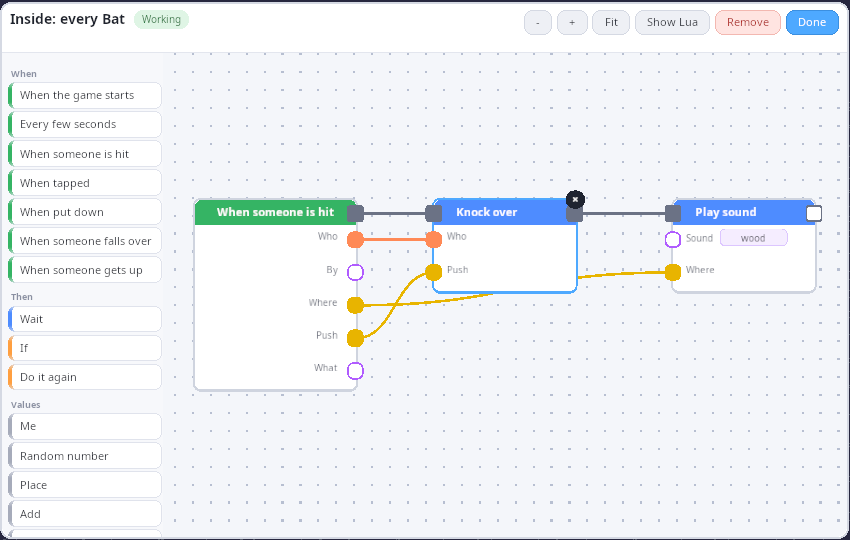
In the sandbox's Play mode, the Look picture ("Inside") opens the node graph behind something:
- Look, then a picture in the palette: that block's recipe, for every one of them. The bat's is When someone is hit (by the bat) → Knock over (who, push) → Play sound "wood" (where), and it is what actually runs when you swing: change it and the bat changes, while the game keeps running.
- Look, then a thing in the world: a graph for just that one person or
box (
mein the graph). Look, then the ground: the level's graph (When the game starts, Every few seconds). - Show Lua shows the Lua the graph stands for, next to it.
The editor is RmlUi (so it is also there in shipping builds and on touch
screens), drawn in the style of Drawflow
(MIT): white blocks with a coloured head, green for when, blue for do,
orange for if / repeat, grey for values; round ports coloured by what
flows through them; soft curved wires on a dotted canvas. Drawflow is
JavaScript, so its look and way of working are ported, not its code
(games/sandbox/GraphEditor.*).
- Add a block: tap it in the list on the left, or drag a wire from a port into empty space: a menu offers only the blocks that fit that port and wires the new one up.
- Wire: drag from a port to another. Ports that don't fit refuse the wire. Dragging from a wired input picks the wire up again.
- Remove: tap a block or a wire, then its round x (or Remove, Delete, or X on a gamepad).
- Values: - / + for numbers, tap to cycle sounds and blocks, tap to flip yes/no; typing is only for text and places.
- Move around: drag the empty canvas; zoom with the wheel, pinch, the
- / + buttons or the triggers. Fit (or Y) shows everything.
| Mouse | Finger | Gamepad | |
|---|---|---|---|
| Press, drag | left button | one finger | A with the ring cursor |
| Move the view | drag the canvas | two fingers | right stick |
| Zoom | wheel | pinch | triggers |
| Remove what's selected | Delete | the x | X |
| Show everything | Fit | Fit | Y |
| Close | Done, Esc | Done | B |
How it works (kke/NodeGraph.h, kke/PlayScript.h):
- The node library is the Lua API. Every documented binding
(
ScriptVM::registerFunctionwith akke::ApiFunction: label, doc, typed parameters) becomes a block, and every documented event (describeEvent) a when block. Adding aplay.*binding adds a block. - A graph runs as Lua.
compileGraphturns it into the script it stands for (hooks,timer.Simple,if,for) and loads it into a ScriptVM, the same one hand-written scripts use. "Show Lua" is that text. - Live: every change recompiles; a graph whose Lua changed is reloaded (things it brought out are taken away first). Blocks light up yellow as they run.
- Errors land on blocks: a missing input or a circle is shown on the block before it runs; a Lua error while it runs is mapped from its line back to the block that made that line.
- Saved with the level: graphs are part of
kke.scene(per placed thing, the level's, and recipes that differ from the default; seekke/SceneFile.h). KKE_SANDBOX_LOOK=bat(orlevel) starts with that graph open (developer builds; screenshots).
What makes Simple mode simple
Rules for anything added to the Simple palette:
- One gesture per block. Drag it out, or click with it. No modes, no menus, no typing.
- Pictures, not words. Labels are one short word under a picture.
- Nothing can go wrong for good. Get up, Clear and Ctrl+Z undo everything; nothing asks "are you sure?".
- Immediate and physical. Things react the moment you act, and they react like things (fall, tumble, bounce), because that is the fun.
- Every block is a recipe of real blocks, so it can be opened in the node graph later.
Is it attainable?
Yes. Most of the hard parts already exist:
- Simple: the sandbox already places assets, ragdolls, breaks things and saves levels; the Play palette and bat are a thin layer on top. What is left is more blocks (a ball launcher, a trampoline, a door, a score), a "play my level" button that turns the scene into a game, and making the palette data-driven so new blocks are Lua recipes.
- Advanced: Lua v2 has hooks, timers, physics, models, UI, scenes and
networking, and the play blocks are bound (
play.*, theHit,Clicked,Placed,FellOverandStoodUpevents). Still to do: loading a hand-written script onto one placed thing. - Intermediate works in the sandbox (above). Still to do: more blocks (push, score screens, a door), grouping blocks into your own block, and real touch hardware checking the feel (docs/HARDWARE_TESTS.md).